How Do Discord Giveaway Bots Handle Invite Requirements?
If you've looked for a Discord giveaway bot with an invite requirement to enter (or an "invite friends" task), you've probably noticed none of them offer it directly. That's intentional. The compliant alternative is a referral system: every participant gets a unique link to share, and when someone enters through that link, the original participant earns bonus entries. Same outcome (wider giveaway reach through voluntary sharing), different mechanic underneath.
This guide explains why the industry moved to referral systems, how ScopliDrop's implementation works, what every setting does, and the strategies that consistently turn referral giveaways into viral ones.
Quick Note on Discord's Rules
Tracking Discord invite codes and rewarding them is prohibited under Discord's Platform Manipulation Policy, because that pattern historically produced spam DMs and unsolicited contact. A referral system is a different feature: it tracks web link clicks, not invite codes. The link is designed for broad, public sharing the same way any web sweepstakes link works: a Reddit post in a giveaway sub, a tweet with the prize visible, a post in the participant's own community. People who see it choose to enter the giveaway itself.
The auto-join to your Discord server happens through Discord OAuth when they sign in to enter, so you can notify them if they win. Membership follows from joining the giveaway, not the other way around.
For the full policy breakdown and what counts as compliant vs. not, the dedicated guide on Discord's invite reward rules covers it in depth. For the rest of this article, we'll focus on how the feature actually works and how to use it well.
How the Referral System Actually Works
The flow is intentionally simple. Once you flip the toggle on a giveaway, every participant gets a personal link the moment they enter. Sharing that link is what triggers bonus entries.
- 1
User enters and clicks the referral button
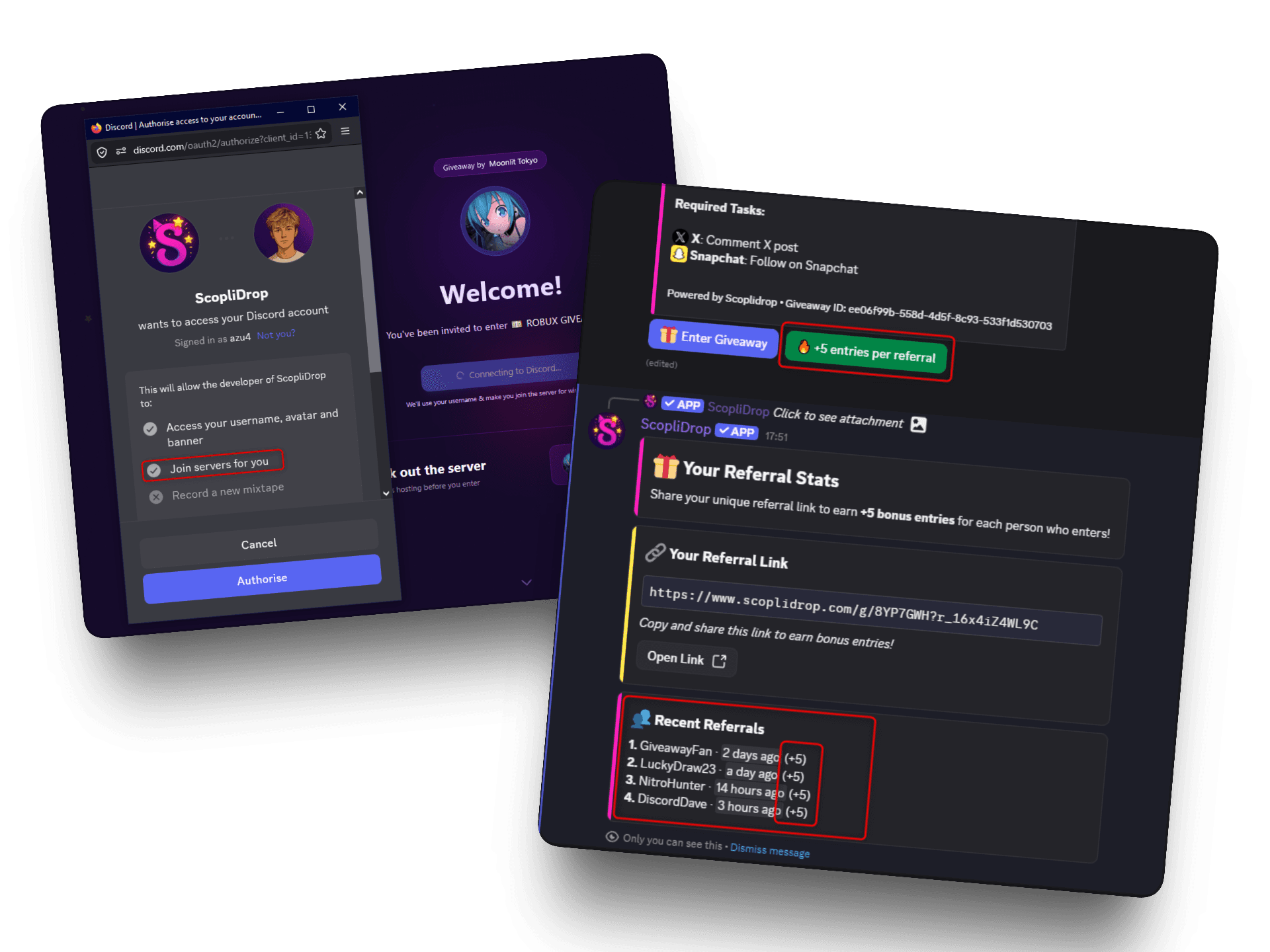
Every giveaway with referrals enabled shows a referral button right on the Discord embed ("🔥 +5 entries per referral"). Clicking it reveals the user's unique referral link, something like
scoplidrop.com/g/your-prize?r_2kPxM9. - 2
They share the link publicly
On Twitter, Reddit, their own Discord server, anywhere a public link belongs.
- 3
Someone clicks and enters the giveaway
The link opens the entry page, and the new visitor joins the giveaway through it.
- 4
New participant auto-joins your Discord
Through Discord OAuth at sign-in, so you can notify them if they win.
- 5
Referrer gets their bonus entries
The original sharer's entry count increases by the bonus amount you set.
The auto-join step is the critical detail. Without it, the referrer brings in entries but not members, and the host gains nothing tangible from the share. With it, every successful referral is also a new server member — and because they deliberately clicked through to enter your giveaway, they arrive genuinely interested in what you're offering, not forced in by a spam DM. That's the difference between growing a community and inflating numbers.
Inside Discord, the giveaway embed shows a second button next to "Enter Giveaway" with a flame emoji and the bonus amount. The label updates in real time depending on your settings, so participants know at a glance whether they should rush to share or take their time.
The Four Settings That Control Your Referral System
When you enable referrals on a giveaway, four settings shape how the system behaves. Each one targets a different problem: motivation, fairness, urgency, or repeat abuse.
| Setting | What It Does | Recommended Range |
|---|---|---|
| Bonus entries per referral | Number of extra entries the referrer earns per successful referral | 5 (balanced) to 20 (aggressive viral push) |
| Per-user limit | Caps how many referrals a single person can be rewarded for | 3-5 (fair odds) or unlimited (max viral) |
| Global limit (FOMO mode) | Caps total referral bonuses awarded across all participants | 40-100 (creates urgency) |
| Unique referrals only | Blocks the same referrer-referee pair from triggering bonuses on multiple giveaways | Leave on for serial-host servers |
The defaults in the dashboard are sensible (5 bonus entries, no caps, FOMO off), but the interesting work happens when you tune them on purpose. The bonus amount is your motivation lever, the per-user limit is your fairness lever, and the global limit is your urgency lever. Picking the right combination is what separates a giveaway that goes viral from one that just sits there.
The unique-referrals toggle stops referral farming. If you run giveaways often, the same small friend group will refer each other week after week, inflating their entries without bringing in anyone new. Turn this on and each referrer-referee pair on your server only counts once, ever. The same friends can still enter, they just stop earning bonus entries from referring each other again.
If those "different accounts" are actually one person on alts, alt-account and fraud-ring detection handles it automatically. Unique-referrals covers the case where they're genuinely different people stuck in a closed loop. Leave it off for casual use, turn it on if you run multiple giveaways a week.
What FOMO Mode Does to Sharing Behavior
FOMO mode is a referral setting that caps the total bonuses awarded across a giveaway and displays a live "Only X left" counter on the Discord button, creating urgency as slots disappear. It's also the most underused setting on the referral system, and the one with the biggest impact on viral velocity.
When you enable it, the referral button on Discord stops saying "+5 entries per referral" and starts saying "+5 entries per referral • Only 27 left". As referrals come in, the number ticks down in real time. When it hits zero, the button turns red and reads "Referral bonuses ended (40/40)".
That tiny piece of UI changes how people behave. OptinMonster's research on urgency and conversion rates shows scarcity tactics can lift conversions by up to 33%, with social-proof urgency notifications adding another ~15% on top. The mechanism is psychological reactance: when people sense an opportunity might disappear, they act faster to keep it.
Set the global cap below your expected entry count. If you expect 200 entries, cap at 40-60 referral bonuses. The race to claim slots is what creates the viral push. A cap that nobody can realistically hit gives you no urgency at all.
The default global limit when FOMO is enabled is 40, which works well for giveaways expecting a few hundred entries. For a giveaway you expect to crack 1,000 entries, lifting the cap to 100-150 keeps the race meaningful. If you have no idea what to expect, start with the default and tune the next one based on results.
One ethical note worth keeping: only use FOMO when the cap is real. If you set 40 and silently bump it later, you're doing the same trick that wrecks trust in fake countdowns on landing pages. Set it, mean it, and let it run out if it runs out.
Five Strategies to Make Your Referral Giveaway Go Viral
A referral system on its own does nothing. People need a reason to share, a path to share, and a small push to actually do it. These are the strategies that consistently produce viral results on the platform.
1. The Taskless + 20 Bonus Combo
This is the highest-converting setup for pure reach. Set the giveaway to taskless mode (one entry just for joining), then crank the bonus per referral up to 20. The math becomes obvious to anyone looking at the embed: not sharing means staying at 1 entry while everyone else stacks 20, 40, 80. Sharing becomes the only way to actually compete.
Because there are no other tasks competing for attention, every participant lands on the screen with the referral link as the main action. Conversion to "first share" jumps significantly compared to giveaways where the referral link is the fifth thing on the page.
The downside: a small handful of motivated sharers can lock up the top of the leaderboard. Pair this with a per-user cap of 3-5 if you want fairer odds, or leave it unlimited if your goal is pure viral velocity over fairness.
2. Send a Follow-Up Message in the Channel
This is the single most effective change you can make to any giveaway. After posting the giveaway embed, send a follow-up message in the same channel that explicitly tells people the referral system exists and what they get from it.
Something like:
Referral mode is enabled. Each share gives you +20 extra entries. Sharing your link is genuinely the best way to win, the leaderboard is going to be decided by referrals.
You'd be surprised how many participants enter, never click the referral button on the embed, and miss the whole mechanic. A plain-text message above the giveaway closes that gap and reliably increases referral activity by a multiple. It's free, it takes 30 seconds, and most hosts skip it.
3. Use the Per-User Cap to Protect Fair Odds
If your goal is community growth without one or two power-users winning everything, set the per-user limit to 3. Every participant can earn the bonus on their first three referrals and nothing after. The leaderboard stays competitive, casual sharers feel like they have a real shot, and you still get meaningful growth.
This is the right setup for high-value prizes, partner-sponsored giveaways, or any contest where a winner that nobody recognizes would feel sketchy. It's also the right setup if your community is small enough that the same handful of regulars would otherwise dominate.
For viral, low-stakes giveaways where you want maximum reach, leave it unlimited and let the most motivated sharers go all in.
4. Encourage Sharing Outside Discord
The biggest mistake hosts make is treating their referral link as a Discord-only tool. The whole point of the system being web-based is that the link works anywhere. Tell participants explicitly to drop the link on:
- Reddit, in giveaway-friendly subreddits like r/GiveawaysOnDiscord (built specifically for this) and any niche sub that matches the prize
- Twitter/X, with a screenshot of the prize and the link in the post
- Their own Discord server, where members will see it organically
- Personal social posts on TikTok, Instagram, or wherever their audience already follows them
Reddit alone can account for the majority of entries on a well-promoted giveaway. The entry page is built to convert cold traffic, with the prize, the timer, and the entry button above the fold, so external clicks behave roughly like internal ones.
For a deeper look at how to use giveaways for cross-platform growth, see the post on growing your Discord server in 2026.
5. Combine With FOMO Mode for the Final Push
The strongest setup combines the taskless + 20 bonus structure with FOMO mode capped at 60-100 slots. The taskless format makes referrals the obvious move, the high bonus makes every share feel valuable, and the visible cap on the Discord button creates a race to claim slots before they run out.
When the global counter is sitting at 47/60, the people watching the giveaway start sharing within minutes, not hours. The combination of "the only way to win" and "limited slots" is what turns a regular giveaway into one your community talks about.
How to Enable the Referral System
The setup lives inside the giveaway builder, alongside the other engagement settings. There is no separate flow.
- 1
Open the giveaway builder
From your dashboard, start a new giveaway or open an existing draft. Scroll to the Viral Sharing section.
- 2
Toggle on the Viral Referral System
Click the toggle labeled "Enable Referral Tracking". Four configuration fields will appear underneath.
- 3
Set the bonus per referral
Default is 5, max is 100. Use 5-10 for normal giveaways. Use 15-20 if you want sharing to be the obvious winning strategy.
- 4
Choose your caps
Leave per-user empty for unlimited, or set 3-5 to protect fair odds. Toggle on FOMO mode if you want a global cap that creates urgency. Default global cap is 40 slots.
- 5
Optionally enable Unique Referrals Only
Recommended if you run multiple giveaways per week. Breaks circular referral rings and stops the same friend pair from triggering bonuses repeatedly across different giveaways on your server. This is the anti-abuse lever.
- 6
Publish and send the follow-up message
Once the giveaway posts to Discord, send a plain message in the same channel telling participants about the bonus. This is the single biggest lever on referral activity.
Where to Tell Your Community to Share the Link
The referral link is a web URL, so it works anywhere a URL works. The best results come from telling participants exactly where to drop it instead of leaving them to guess.
For prize-driven giveaways (gift cards, gaming gear, popular subscriptions), Reddit is by far the highest-leverage venue. Subreddits like r/giveaways, r/Sweepstakes, and r/contests get tens of thousands of viewers actively looking for opportunities to enter. A single Reddit post with a referral link can drive hundreds of entries to one participant, which alone justifies running the system.
Twitter/X works well for visual prizes. A screenshot of what's being given away, a one-line caption, and the link will outperform a text-only tweet by a wide margin. For niche communities, partner Discord servers are the cleanest channel: a quick post in an allied server (with permission) reaches an audience that already cares about the topic.
What does not work, and what Discord actively penalizes, is mass-DMing the link to strangers. A legitimate referral system shouldn't need that. If your link is sitting in front of an audience that wants the prize, the math takes care of itself.
Pair the Referral System with a Join Task
The referral system handles viral reach, but it's not a server-join mechanism on its own. Anyone clicking a referral link does auto-join your server through OAuth so they can be notified if they win, but pairing the giveaway with an explicit join task as well is what turns referrals into a guaranteed growth pipeline.
The strongest setup looks like this:
- Join task as the entry requirement (every participant joins your server)
- Referral system layered on top with a 5-20 bonus per referral
- FOMO mode if you want a viral push at launch
Every entry gives you a member directly. Every share gives you the chance at more. Together, those two features cover the two halves of the growth equation: capture and distribution.
For more on why join tasks are compliant and how they fit into a giveaway, see the post on Discord join tasks and TOS.
Frequently Asked Questions
Ready to Run Your First Viral Giveaway?
The referral system is the modern way Discord giveaways grow. It rewards participants for sharing your prize on the platforms where their audience actually lives, brings new members into your server through voluntary opt-ins, and operates entirely within Discord's policies.
Pick a prize, set the bonus to 10-20, turn on FOMO mode, and send a follow-up message telling people to share. That's the playbook. The first time you see a participant pull 200 entries from a single Reddit post, you'll understand why this is the feature most active hosts won't run a giveaway without.