How Do You Automate Discord Giveaway Launches?
To automate giveaway launches, use a Discord giveaway bot with scheduled giveaways, like ScopliDrop. You configure the giveaway exactly as you would for a live run, pick a start and end date, and the bot posts the embed to your channel automatically when the scheduled time hits. Nobody has to be online to launch it, nobody has to remember, and the giveaway runs on time whether you're at your desk or asleep.
For a giveaway you run on a fixed rhythm, you can go a step further with recurring giveaways: set a rule once ("every Monday at 8 PM"), and the bot launches a fresh giveaway on that schedule forever, with no re-scheduling between runs.
This guide covers the full automation flow: how scheduling works under the hood, how recurring series turn a weekly giveaway into a set-it-once task, the timing strategy that actually moves entry numbers, how to set a consistent cadence, and plan limits for how many giveaways you can queue at once.
Why Schedule Giveaways Instead of Posting Manually?
Posting a giveaway the moment you finish writing it is the most common mistake server owners make. It's fast, but it ignores one of the biggest variables in giveaway performance: when your audience is actually online.
A giveaway launched at 3 PM on a Tuesday has a smaller window of live participation than the exact same giveaway launched at 8 PM on a Friday. People enter right after launch, share right after launch, and drop off over the following 24 hours. If the first few hours miss your peak, the whole giveaway underperforms.
Scheduling solves a few specific problems at once:
- Peak-time launches without needing someone awake at 8 PM local time across multiple timezones
- Consistent cadence — a weekly giveaway at the same time trains your community to show up
- Preparation time between building and launching, so you can review settings, invite sponsors, or coordinate cross-promotion
- Set-and-forget series where a week's worth of giveaways is queued in advance and launches itself
The manual approach also fails silently. You forget the launch window, post it an hour late, the Reddit audience you were counting on has logged off. Scheduling removes the human reliability layer entirely.
How the Scheduling System Works
Every scheduled giveaway is a full configuration snapshot plus a start and end time. When you schedule, the system stores every setting you picked (prize, tasks, referral config, winner count, role pings, image, everything) and queues the launch. At the scheduled start time, the bot posts the giveaway embed to your channel and starts accepting entries, exactly as if you'd clicked "Launch" manually at that moment.
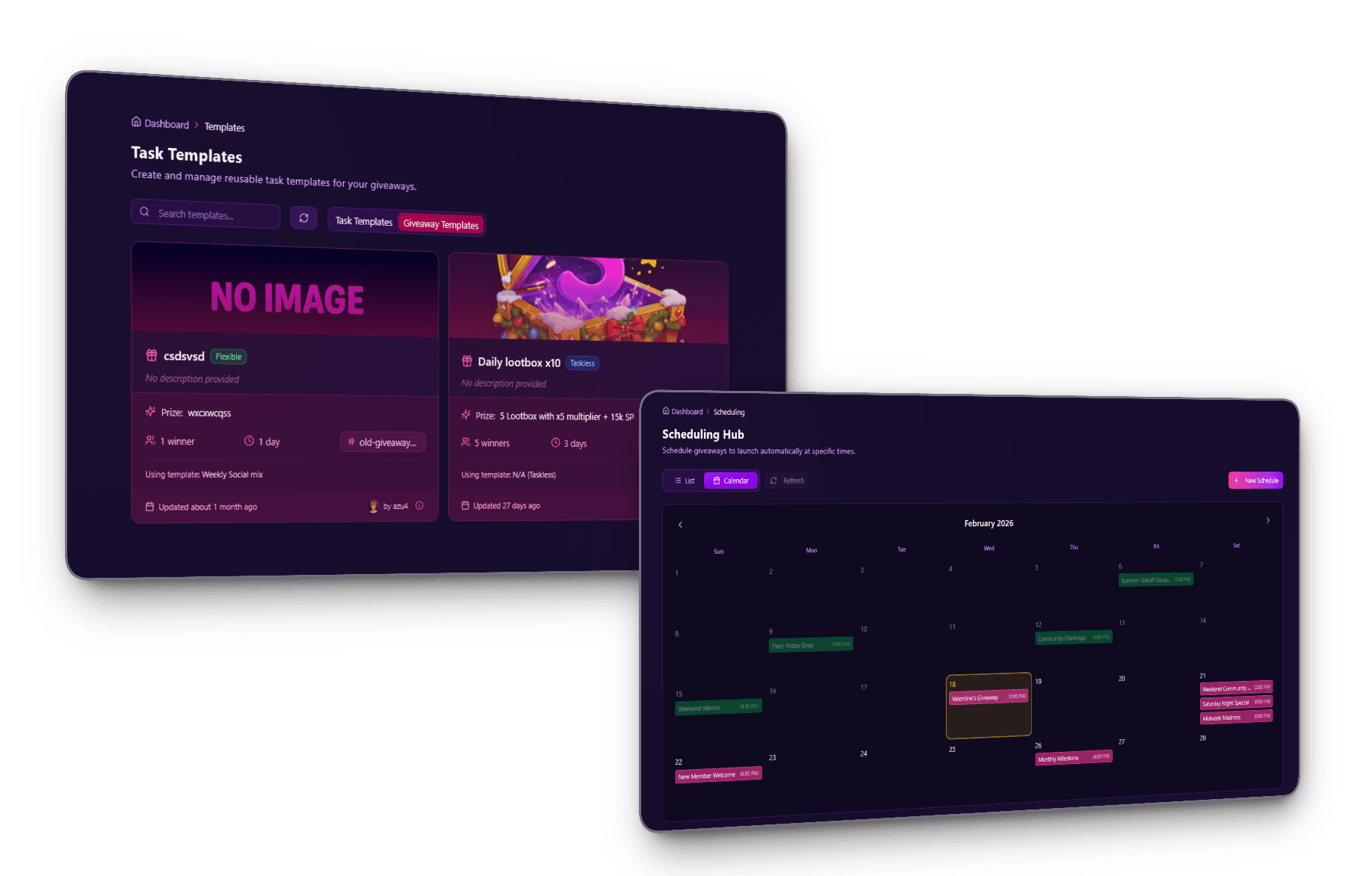
The scheduling dashboard offers two views of the same data:
- List view — upcoming scheduled giveaways in chronological order, with prize, channel, launch time, and status
- Calendar view — a month-grid layout showing which days have scheduled launches, useful for spotting gaps or density when planning a cadence
Each scheduled giveaway moves through three statuses: pending while waiting for its launch time, launched the moment the bot posts it, and failed if something blocked the launch (missing channel permissions, deleted channel, expired subscription). Failed schedules are visible in the history view so you can diagnose what went wrong and reschedule.
Launch-now override. If you schedule a giveaway for Friday 8 PM but want it live immediately, the "Launch Now" button fires it right away without waiting for the scheduled time. Useful when plans shift or you want to test the configuration before the actual run.
The scheduler runs on a central process that's always online, independent of any user session. Close the dashboard, close your laptop, go on vacation. The scheduled giveaway launches regardless.
Recurring Giveaways: Set the Rule Once, It Runs Forever
A recurring giveaway is an automated giveaway that launches on a repeating schedule (daily, weekly, or monthly) and keeps going until you stop it. You define the rule once and the bot posts a fresh giveaway every cycle, with no re-scheduling between runs. Where a single scheduled giveaway fires once at a set time, a recurring series fires on every cycle on its own. This is the real "set it and forget it" tier of automation: a weekly Nitro drop, a monthly community raffle, a daily small-prize hype giveaway, all running with zero touch after setup.
The recurrence rule has a few parts:
- Frequency — daily, weekly, or monthly
- Interval — every N days, weeks, or months (every week, every 2 weeks, etc.)
- Days — for weekly, pick one or more weekdays (e.g. Friday and Sunday); for monthly, pick the day of the month (a day later months don't have, like the 31st, falls back to that month's last day)
- Time and timezone — the wall-clock time the giveaway launches, interpreted in the timezone you choose. The engine is DST-correct, so "8 PM Eastern" stays 8 PM Eastern across daylight-saving shifts instead of drifting an hour
- Stop condition — never, on a specific date, or after a set number of giveaways
ScopliDrop recurring giveaway configuration showing frequency, day-of-week, time, timezone, and stop-repeating options
Under the hood, the series only ever queues one upcoming giveaway at a time. The moment that one launches, the next is automatically scheduled from your rule. The scheduler runs on an always-on process, so the chain continues whether your dashboard is open or not, and survives restarts. You can pause a series at any time and resume it later, edit the rule, or delete it entirely from the scheduling tab.
Recurring vs. templates: same prize or a fresh one?
A recurring series reuses the exact configuration you set up, including the prize, on every run. That's perfect when the prize is consistent by design ("$10 Nitro every Monday"). When you want the rhythm of recurrence but a different prize each time, you have two clean options:
- Edit the series prize whenever you want to change what the next run gives away. The change applies to every future occurrence.
- Use a giveaway template instead when each run is genuinely a different giveaway. Save the setup once, then schedule it with a new prize in about 30 seconds per run. The calendar view makes queueing weeks ahead fast.
Rule of thumb: recurring for "the same giveaway, forever"; template + schedule for "the same format, new prize each time."
When to Actually Schedule Your Giveaways
Timing is the highest-leverage decision in giveaway performance, and it's the one manual posting usually gets wrong. These are the variables that matter, in order of impact.
Launch Hour
The first two hours after launch produce the majority of entries and shares on most giveaways. Missing peak activity during those hours compounds through the rest of the run. For most Discord communities, that peak sits between 6 PM and 10 PM local time for your dominant timezone. Gaming communities skew later (8-11 PM), professional communities skew earlier (5-7 PM after work).
If your audience spans multiple timezones, pick the window that covers the largest chunk. For US-heavy servers, 7-9 PM Eastern captures both coasts. For Europe-heavy servers, 8-10 PM CET hits Western Europe's prime evening. When you tease the upcoming launch in your announcements channel, use a Discord timestamp so every member sees the correct local time. The bot embed auto-converts, but plain-text hype posts don't.
Discord's Server Insights shows peak activity hours for Community-enabled servers. If you have it, use it. If not, eyeball your channels' message timestamps over the last week.
Day of Week
Friday, Saturday, and Sunday evenings outperform weekday launches by a noticeable margin, particularly for gaming and entertainment communities. Mondays and Tuesdays are the weakest. For B2B or professional communities, the pattern can flip — Tuesday-Thursday outperforms weekends because people are at their desks.
Duration
The sweet spot is 24 to 72 hours. Under 24 hours misses participants who only check Discord once a day. Over 72 hours creates dead middle days where no one's thinking about the giveaway, shares dry up, and momentum fades.
The single exception is big-prize giveaways (high-value items, major sponsor collabs) where a 5-7 day window gives the referral system time to go viral across Reddit and Twitter. If you're running a referral-focused viral giveaway, the longer window compounds sharing.
Cadence
| Cadence | Best For | Tradeoffs |
|---|---|---|
| Weekly | Small-to-mid servers building habit | Requires a prize every week, can feel like a treadmill |
| Bi-weekly | Most servers, best balance | Slight drop in "expected" habit formation |
| Monthly | Established servers with big prizes | High per-giveaway impact, lower total engagement lift |
| Event-driven | Launches, holidays, seasonal moments | Highest peaks, no baseline habit |
Most active communities land on weekly or bi-weekly as the default rhythm, with monthly special giveaways layered on top. If your cadence is fixed, a recurring series removes the treadmill entirely: set "every Friday at 8 PM" once and the weekly giveaway runs itself, while you layer one-off scheduled giveaways on top for special events.
Seasonal and Event Windows
Specific dates produce outsized results when you plan ahead: Black Friday, Christmas, New Year, back-to-school, Valentine's, summer gaming releases, major esports finals. Scheduling these weeks in advance lets you coordinate prizes with the theme and build anticipation.
Setting Up a Scheduled Giveaway
The flow lives inside the dashboard. You configure the giveaway exactly as you would for a live launch, then pick dates instead of clicking publish.
- 1
Open the Scheduling tab
From your server dashboard, go to the Scheduling tab. Choose between list view or calendar view depending on what you're planning.
- 2
Start a new scheduled giveaway
Click Create Schedule. The form matches the normal giveaway builder with added start and end date pickers. Match the start to your audience's peak window. Default duration of 24-72 hours fits most use cases.
- 3
Load a template (optional but recommended)
If you have saved giveaway templates, pick one. It pre-fills every field except the prize and dates, turning weekly scheduling into a 30-second task.
- 4
Confirm and save
The schedule appears in your list and calendar view with status pending. The bot will auto-launch at the scheduled start time. No further action needed.
After the launch time passes, the giveaway is a normal live giveaway: the embed is posted, entries come in, and the bot ends it at the scheduled end date. The schedule record moves to launched status and stays visible in the history view for reference.
Plan Limits for Scheduling
Scheduling is available on every plan, but the limits differ. The free plan is enough to get a feel for the feature and run one scheduled giveaway a day in advance. Premium and Business unlock the full workflow.
| Plan | Active scheduled giveaways | Max days in advance | Calendar view |
|---|---|---|---|
| Free | 1 | 24 hours | Yes |
| Premium | 2 | 30 days | Yes |
| Business | Unlimited | Unlimited | Yes |
Premium lets you keep 2 giveaways pending at a time, up to 30 days out. Since schedules leave the pending queue as soon as they launch, you can maintain a rolling 2-week buffer and add a new schedule every time one fires. Business removes the cap entirely, which matters for agencies managing multiple servers or creators who want to queue weeks or months in one sitting.
The "active scheduled" number is live-pending schedules only. Once a scheduled giveaway launches, it no longer counts against that limit, so the free tier of 1 isn't as restrictive as it looks — you can schedule one, let it launch, then schedule another the same day.
Recurring series have their own limit, since one series replaces an unlimited stream of manual schedules:
| Plan | Active recurring series |
|---|---|
| Free | Not available |
| Premium | 2 |
| Business | Unlimited |
Recurring is a Premium and Business feature. The limit counts active series, so a Premium server can keep two repeating giveaways going at once (say a weekly Nitro drop and a monthly big-prize raffle). Business removes the cap for servers running several recurring rhythms in parallel.
Scheduling vs Discord's Scheduled Events
Worth clearing up a common confusion: Discord has its own Scheduled Events feature, separate from what a giveaway bot does. Discord Scheduled Events create a calendar entry at the top of your server, let members RSVP, and send notifications when an event starts. They don't run giveaways.
A giveaway bot's scheduling feature actually launches the giveaway embed at the scheduled time, handles entries, and picks winners. They complement each other nicely:
- Use Discord Scheduled Events to announce that a giveaway is coming and let members hit "Interested" for a notification
- Use your giveaway bot's scheduling to automatically launch the embed at the agreed time
That combo gives you a notification out to everyone who opted in, synchronized to the exact moment the giveaway goes live. For server-wide events beyond giveaways, see the Discord event ideas guide.
Frequently Asked Questions
Ready to Put Your Giveaways on Autopilot?
Scheduling is the feature that turns giveaways from a manual habit into a reliable growth channel. Queue a week's worth on Sunday, hit peak activity windows every time, and stop thinking about timing for the rest of the week. Set a recurring series and you don't even queue: the weekly giveaway launches itself indefinitely.
Pair it with templates to save the setup work, with the referral system to make each run go viral, and with a consistent weekly cadence to build community habit. The combination is what separates servers that grow through giveaways from servers that just run them.