Why Most Discord Giveaways Go Nowhere
Most Discord giveaways change nothing. You buy a prize, get a burst of reactions, pick a winner, and a week later your server looks exactly like it did before. No new members. No social growth. Nothing that lasts.
The problem isn't giveaways. It's how they're built. Most are set up to do one thing, pick a winner. A good giveaway should also grow your server. It brings in real members, drives social follows, and builds an audience you can reach again.
This guide shows how to run giveaways that compound, so every entry drives something lasting instead of a one-time spike.
What is ScopliDrop?
ScopliDrop is a Discord giveaway bot that turns every giveaway into a growth engine. It offers requirement-based tasks, viral referral systems, and alt/bot fraud detection with 55+ tasks across 17+ platforms, built-in activity tracking, and XP systems.
What Makes It Different
- Requirement giveaways AND taskless giveaways — full flexibility based on your goals
- 55+ growth tasks across 17+ platforms — grow everywhere your audience lives
- Built-in activity tracking — XP, levels, and tasks that reward real server engagement
- First Discord-compliant referral system — viral sharing without spammy invite links
- Anti-fraud detection — the first and only bot that catches bots and alt accounts
The free tier includes unlimited taskless giveaways, task-based giveaways, the full referral system, and social media tasks across 17+ platforms. No paywalls on core features. See all features →
How to Set Up Your First Discord Giveaway
Get started in four steps.
- 1
Install the Bot
Add ScopliDrop to your server using the invite link, or click "Install Bot" from your server list.
- 2
Find Your Server
Open the server list and select your server. You'll only see servers where you have Admin, Manage Server permissions, or where someone granted you access via ScopliDrop's Permissions tab.
- 3
Explore the Dashboard (Optional)
Get familiar with the available tabs: Giveaways, Templates, Analytics, Permissions, and Settings. Each gives you powerful tools for running and optimizing giveaways.
- 4
Create Your First Giveaway
Head to the Giveaways tab and click New Giveaway. The guided form walks you through everything: prize details, task selection, referral system setup, and saving as a reusable template. Start creating now →
Save time with Templates. After creating your first giveaway, save it as a template. Future giveaways take seconds to launch.
The Four Entry Modes
ScopliDrop offers four entry modes, each designed for different goals.
Taskless
One-click entry with no requirements. Anyone can join instantly. Still works with referrals for organic growth. Best for quick engagement and rewarding loyal members.
Task-Required
Participants must complete at least one mandatory task to enter, and optional bonus tasks earn extra entries. The giveaway is posted in Discord, and the Enter button takes entrants straight to a linked giveaway page to complete their tasks, with no separate login since the link already carries their Discord identity. That page unlocks the full task library: social tasks across 17+ platforms (X, YouTube, TikTok, Instagram and more), not just Discord actions, plus anti-fraud screening with alt-account detection on every entry. Best for maximum growth per giveaway.
Flexible (Base + Bonus)
Members get a free base entry with a single click, right from the Discord message. Optional tasks on the linked giveaway page earn bonus entries, with the same full cross-platform task library and alt-account detection as Task-Required. No barrier to entry, but motivated users do more. This is the recommended mode for balancing participation with engagement.
Discord In-App
The entire experience happens inside Discord. Only Discord-native tasks are available (join, roles, voice activity, messages, level), and each task can be set as required or optional. Optional ones earn bonus entries, all verified by the bot. There's no hosted page, so cross-platform social tasks and alt-account detection don't apply here. It trades them for the most frictionless in-Discord UX. Best when your audience lives entirely on Discord.
| Mode | Entry Barrier | Bonus Entries | Best For |
|---|---|---|---|
| Taskless | None | Referrals only | Discord member growth |
| Task-Required | 1+ mandatory task | Optional bonus tasks | Maximum growth |
| Flexible (Base + Bonus) | None | Optional tasks | Balanced participation |
| Discord In-App | Discord tasks (required or optional) | Optional Discord tasks | Discord-only communities |
Pro tip: Only set your most important action as required. Leave others as bonus tasks. For example, make "Join Discord" required, then add "Follow Instagram" and "Follow TikTok" as bonus tasks worth extra entries.
Growth Tasks Overview
With 55+ built-in tasks across 17+ platforms, you can grow your presence anywhere your audience lives.
ScopliDrop task library showing 55+ growth tasks across social media, Discord, music, and web platforms
Social Media Tasks
Drive followers, engagement, and content views across every major platform:
- TikTok — follow, like, watch videos
- Instagram — follow, like, comment, repost, tag friends
- X/Twitter — follow, like, repost, comment
- Twitch — follow channel
- Kick, Facebook, LinkedIn, Pinterest, Snapchat, Telegram, Reddit — and more
Discord Tasks (Auto-Verified)
These tasks verify automatically, no honor system:
- Join another server — perfect for cross-promotion with partner communities (fully TOS compliant)
- Have specific role — reward active members who already have engagement roles
- Activity-based tasks — messages sent, voice time, XP earned (see below)
Activity-Based Tasks
With activity tracking enabled, you can add tasks based on server engagement:
- Message count — "Send X messages" (total or within a time window)
- Voice time — "Spend X minutes in voice channels"
- XP/Level — "Reach level 5" or "Collect 500 XP"
- Per-day tasks (Premium) — "5 messages per day for 7 days" rewards consistent engagement, not grinding
Bonus: Activity tracking also gives your server a full XP and leveling system. Auto role rewards, /rank stat cards, /leaderrank leaderboards, and /activitylookup for 14-day activity graphs.
Music Tasks
Perfect for artists and creators:
- Spotify — follow artist, save song, follow playlist
- SoundCloud — follow, like, repost
Web Tasks
- Visit website — drive traffic to your site, landing pages, or content
- Provide email (Premium) — build your mailing list directly
Custom Tasks (Business)
Create your own task with a custom name, icon, and data collection. This opens up thousands of possibilities on any platform.
Example: "Sign up for the beta program and submit your email"
The dedicated custom tasks guide covers strategies and setup in detail. You get 55+ built-in task options plus unlimited custom tasks on Business.
Feature Highlights
Running effective Discord giveaways in 2026 is different than it used to be. You need a Discord giveaway bot that keeps up. Here's what's possible now and what actually makes a difference.
The Referral System
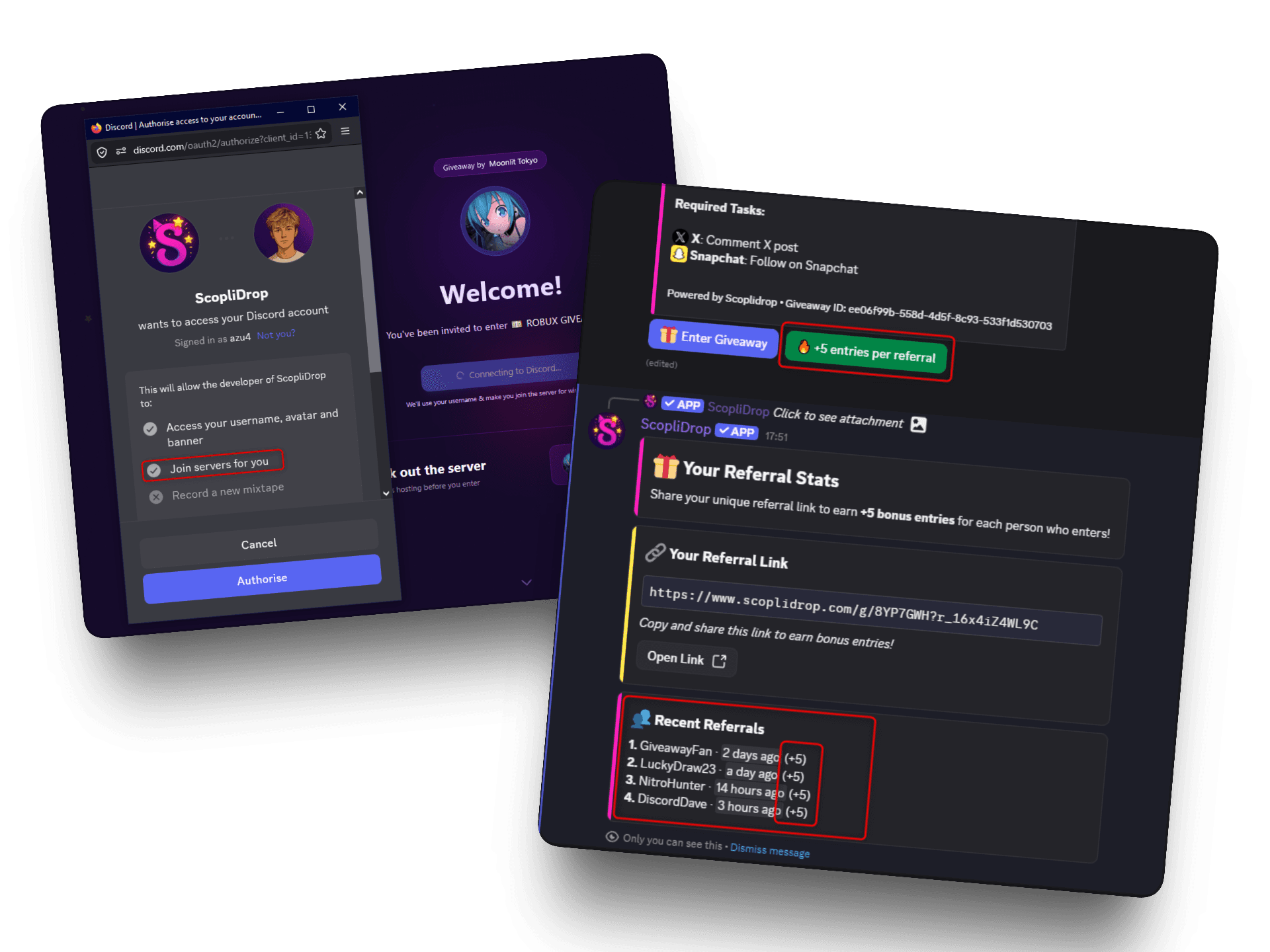
This is where giveaways go viral. Participants can invite friends for more entries, turning every entrant into a promoter.
ScopliDrop referral system showing configuration dashboard and tracking button on giveaway embed
ScopliDrop's referral system works with all entry modes, even taskless. Here's how it works:
- Every participant gets a unique referral link
- Share with friends, earn bonus entries. More invites to the giveaway means more chances to win
- Anyone entering via a referral link automatically joins your Discord. Guaranteed growth.
This is the first Discord-compliant referral system. No spammy invite links, no violation risks. Just organic, viral sharing.
Pro Strategy: Taskless + Referral Focus
Run a taskless giveaway but emphasize that the ONLY way to get bonus entries is through referrals. Result: Maximum participation + viral sharing + everyone joins your Discord. Your members become your marketing team.
For the full strategy playbook, see the dedicated guide on running a viral Discord giveaway with the referral system. This feature alone can 10x your growth.
Anti-Fraud Protection
Keep your giveaways fair and fraud-free. ScopliDrop automatically detects bot accounts and alts so your prizes go to real community members.
ScopliDrop fraud ring detection showing connected alt accounts and flag reasons
ScopliDrop is the first and only Discord giveaway bot with built-in fraud detection. Suspicious accounts get flagged automatically: yellow flags warn you, red flags are excluded from winning outright. On the Business plan, you can see the full fraud ring for any user, every alt account they control and the specific reasons each one got caught.
You focus on running great giveaways. ScopliDrop handles the cheaters.
Templates & Scheduling
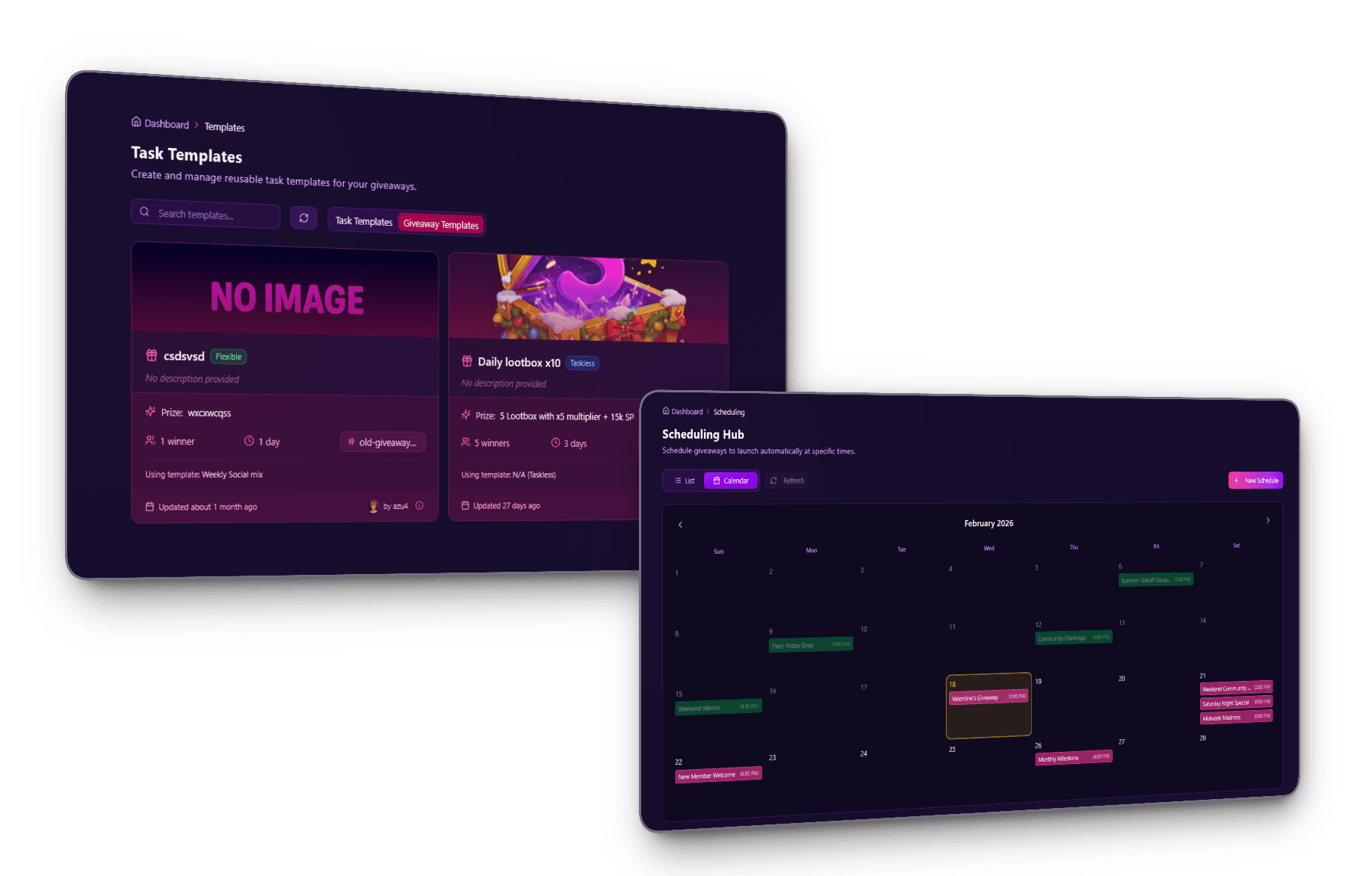
Create once, reuse forever. Save your best giveaway setups and schedule them to run automatically.
ScopliDrop scheduling calendar with templates for automated giveaways
Templates let you save winning configurations:
- Task Templates — Save your favorite task combinations (e.g., "Follow Instagram + Join Discord + Watch TikTok") and reuse them across multiple giveaways
- Giveaway Templates — Save entire giveaway configurations including prize details, entry mode, tasks, referral settings, and duration
Scheduling takes it further:
- Schedule giveaways to start at peak activity times
- Set up weekly or monthly recurring giveaways
- Auto-end at the exact time you specify
Once you find a giveaway setup that works, save it as a template. Your next launch takes seconds instead of minutes.
Winner Cooldown, Blacklist, and Bypass
Make sure your prizes go to the right people.
ScopliDrop winner cooldown and blacklist configuration settings
Winner Cooldown prevents the same people from winning back-to-back. Set a cooldown period and recent winners are automatically excluded from future giveaways. Everyone gets a fair shot, and your prizes reach more unique members.
Blacklist lets you block specific users from entering by assigning a blacklist role. Anyone with that role is blocked at entry and explicitly told they can't participate.
Fairness first. The blacklist applies only at entry. If someone gets a blacklist role after entering, they stay in the giveaway. This prevents abuse from both sides: participants can't be unfairly disqualified, and creators still control who enters.
Bypass roles go the other way. Anyone with a bypass role skips all tasks and gets full entries automatically. Good for rewarding VIP subscribers, server boosters, or your most active community members who shouldn't have to re-earn access every giveaway.
Custom Giveaway Links
Make your giveaways memorable and brandable.
ScopliDrop custom viral share link input section
Instead of sharing a generic URL with a random ID, ScopliDrop lets you create custom slugs for your giveaways:
- Generic:
scoplidrop.com/g/abc123xyz - Custom:
scoplidrop.com/g/summer-nitro-giveaway
Why this matters:
- Easier to share verbally — Tell your audience "go to scoplidrop.com/g/nitro" instead of spelling out random characters
- More professional — Branded links look intentional, not auto-generated
- Better click-through rates — People trust links they can read and understand
Pro Tips & Best Practices
You know how to set up a giveaway and you've seen the features that make requirement giveaways worth running. Now let's talk strategy. These tips will help you squeeze more growth out of every giveaway you run.
1. Actively Promote Referrals
Don't just run the giveaway and hope people notice the referral system. Tell them how to earn bonus entries.
- Announce it: "Share your referral link to get +X bonus entries for every friend who joins!"
- Remind them the link is on the giveaway embed
- Your members become your marketing team
2. Embrace Partnerships
The "Join Discord" task opens up free cross-promotion. Two servers agree to add each other's "Join" task to their next giveaway, and both grow from each other's entry pool. Zero cost, mutually reinforcing growth, and more targeted than any paid ad since both audiences already care about the niche. For the full playbook, see cross-promotion partnerships in the growth guide.
- Reach out to similar-sized communities and propose a partnership exchange
- Alternatively, monetize your giveaways by letting other servers pay for task placement
- Works both ways: ask for partnerships or offer them
3. Duration Strategy
Giveaway length isn't neutral. A 24-hour flash giveaway and a 3-week mega-giveaway create completely different participant behaviors, and the right one depends on what you're optimizing for.
- Short (1-3 days) — FOMO kicks in, people share fast before it ends
- Medium (1-2 weeks) — The sweet spot. Dedicated participants grind referrals and tasks, and sharing peaks mid-giveaway
- Long (3+ weeks) — Major prizes or product launches. Builds anticipation but needs ongoing promotion
4. Use Scheduling
Peak-activity launches outperform off-peak ones by a wide margin on almost every metric. Scheduling lets you hit that window every time without being online yourself, and consistent timing trains your community to expect and show up for your giveaways.
- Schedule giveaways to start when your community is most active
- Automate weekly or monthly giveaways to build anticipation
- Set it up once, let it run without babysitting
5. Set Minimum Participants
A giveaway with only a handful of entries wastes your prize budget. You gave something away but got no distribution, no referrals, and no new members to show for it. The minimum participant threshold holds the winner draw back until real engagement has happened, so your prize goes out on a campaign that actually worked.
- Set a threshold before winners can be drawn
- Ensures meaningful engagement before giving away prizes
- Motivates participants to share so the goal gets reached
6. Track Your Analytics
Running giveaways without looking at the data is just burning prize budget on guesses. Analytics show you exactly which tasks drive entries, which referral links convert, and where participants drop off, so every future giveaway gets sharper.
- Track task completion rates
- See which tasks perform best
- Use this data to improve every giveaway
7. Use Templates Religiously
Templates are the biggest time-saver most people ignore.
- When a giveaway performs well, save that configuration as a template
- You'll never forget what worked best for your community
- Save entire giveaway configurations for recurring events
- What takes 10 minutes the first time takes 30 seconds with a template
8. Require Server Tag Display
Discord's server tag feature lets members display your server as their badge across the platform. Running a giveaway that requires it turns every participant into a visible signal for your community.
- Winners and participants wear your server tag publicly across Discord
- Boosts recognition without spam or invite abuse
- ScopliDrop is the only Discord giveaway bot that supports server tag requirements
Frequently Asked Questions
Start Growing Today
ScopliDrop gives you everything you need to turn giveaways into real community growth: requirement giveaways, viral referrals, 55+ cross-platform tasks, activity tracking, and anti-fraud protection.
Start free. See results. Upgrade when you're ready.
Ready to try the Discord giveaway bot that actually grows your server?